
![[Thorough Comparison] What Are the Recommended CRM Tools? Explaining Benefits of Introduction and How to Choose](https://images.microcms-assets.io/assets/c097f8ce630d4dc08c826d3fb9b47604/a3942368dd064548a7788155476c1808/2_e18f090b_3a22d523.jpg?fm=webp)
What are CRM tools?
CRM stands for "Customer Relationship Management," which means "Relationship Management with Customers" in Japanese.
Management of customer information is important in sales and marketing activities. By introducing a CRM tool, it becomes possible to send the most suitable information to each customer.
As a result, customer satisfaction increases and trust relationships improve, which will lead to the expansion of sales and revenue.

Main CRM Tool Functions
Main CRM tool functions range from basic functions to sales activity support management and marketing support management.
- Basic Functions
① Customer Information Management
Basic information of customers (name, address, person in charge, contact information, etc.)
② Contact History Management
Saving communication history with customers and managing contact history.
③ Lead Information Management
Registration of lead information, tracking, and management of potential customers.
④ Task Management
Recording next activities and setting notification for response deadlines.
- Sales Activity Support Management
Progress management of sales activities (visit date, phone call, email, interview content, etc.).
- Marketing Support Management
Batch delivery of emails, creation of web forms such as inquiry forms, browsing history of your company's website, and importing business card information.
Types of CRM Tools
There are mainly three types of CRM tools: sales support type, call center type, and marketing support type.
- Sales Support Type
In the sales support type CRM tool, visit dates, progress of business negotiations, and project content are managed. Also, since customer information is automatically linked, it is possible to send emails or direct mail with content tailored to the customer.
As a result, operational efficiency of sales representatives can be improved, leading to increased sales.
- Call Center Type
In the call center type CRM tool, inquiry content and complaints from customers via phone or email are accumulated as a database.
Since information for each customer is managed, it becomes possible to check past information, which will lead to trust.
- Marketing Support Type
In the marketing support type CRM tool, tasks such as regular email delivery and SNS outgoing operations are performed based on customer information.
By automating, the effort to send emails to each customer can be eliminated, improving operational efficiency.

In what situations and for whom is a CRM necessary?
A CRM is a necessary tool for those struggling with sluggish sales growth due to customer loss and those who want to reduce costs. Since acquiring new customers costs a lot, costs can be suppressed by having existing customers become repeaters. To achieve this, it is necessary to approach appropriately so that there is no loss of existing customers. By introducing a CRM, you can provide services tailored to each individual by analyzing customer information such as age, gender, and purchase history.

Benefits of Introducing a CRM Tool
Benefits of introducing a CRM tool include "unified management of information," "improvement of customer satisfaction," "reduction of sales costs, and improvement of efficiency."
Here, we introduce the characteristics of these benefits.
Unified Management of Information is Possible
When information about customers or multiple systems are scattered, it may happen that you don't know where the information is.
If you use a CRM tool, information will be managed in one system, and you can quickly find the necessary information, so you can improve operational efficiency.
Improvement of Customer Satisfaction
In doing business, it is necessary to respond appropriately to customer needs.
By introducing a CRM tool, you can know what customers are looking for based on detailed information and past history for each customer. You can approach them at the right timing, and customer satisfaction will increase.
Reduction of Sales Costs and Improved Efficiency
By using a CRM tool, it is possible to reduce sales costs. Since a CRM is equipped with various functions such as customer information, you can reduce the work time spent so far by using appropriate functions. As a result, operational efficiency will increase, leading to a reduction in sales costs.

Drawbacks of Introducing a CRM Tool
There are also drawbacks to introducing a CRM tool. Mainly, items like "introduction costs," "time until effects after starting operation," and "effort for maintenance and support" are mentioned.
It is important to introduce it after understanding the drawbacks as well.
Introduction Costs are Incurred
If you introduce a CRM tool, costs will be incurred.
Initial costs and monthly costs are about 2,000 yen or more. If there are many users of the CRM tool, introduction costs will be even higher.
To suppress costs, it is safe to try a trial to see what kind of CRM tool suits your company.
It Takes Time to See Effects After Operation Starts
CRM tools do not show effects immediately after the start of operation. Effects become visible by continuing to use the CRM. The important thing is to build a system within the company. For that purpose, effects will become visible by preparing manuals and workflow, and reflecting feedback from CRM tool users. It is necessary to understand that it takes time to see effects.
Effort is Required for Upkeep and Maintenance
Maintaining and supporting a CRM tool requires effort. This primarily includes regular backups, system updates, and bug fixes. Neglecting maintenance lead to potential data loss or improper system performance.
It is safe to set up a management system to check for malfunctions on a daily basis.
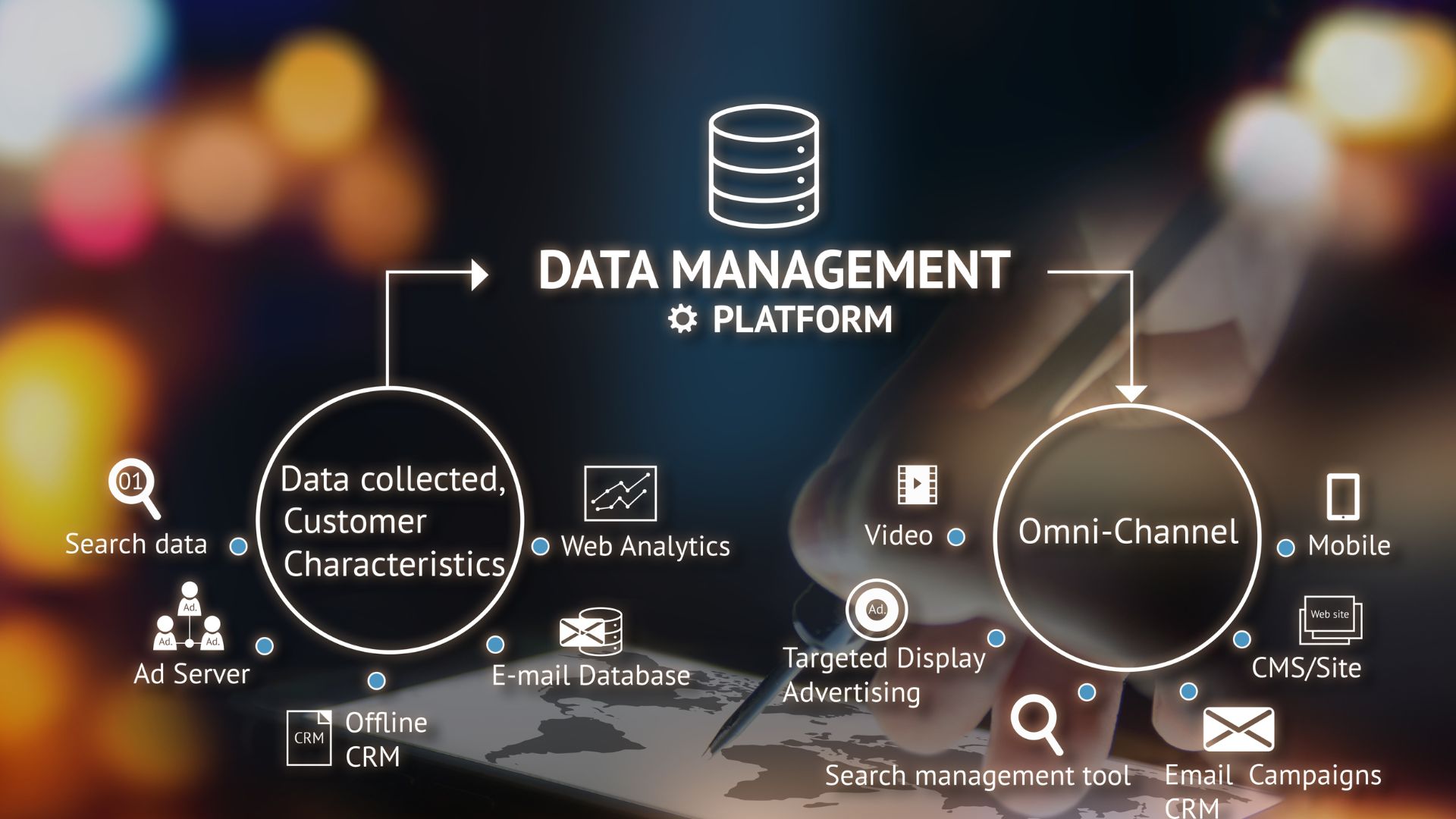
Three Key Select Points for CRM Tools
There are various types of CRM tools. Here we introduce three points to choose what kind of CRM tool is appropriate for your company.
Clarification of Purpose of Use
First, clarify the purpose of use in your company. When introducing a CRM, check what kind of issues exist and what targets you want to set for the future. By clarifying issues and purposes specifically, you can choose a CRM equipped with necessary tool functions.
Integration with External Tools is Possible
Some CRM tools allow integration with external tools. If integration with tools already introduced is possible, convenience will also improve by continuing to use the tools currently in use. If your company uses certain tools, it would be good to choose a CRM tool that allows integration.
Prices for Initial Cost and Running Cost
When introducing a CRM tool, there are initial costs and running costs that occur continuously. Among many CRM tools, a comparison with other companies will be necessary to suppress costs as much as possible.
Also, for running costs, fees are often set per user.
About CRM Tool Sikiapi
Sikiapi is a marketing automation tool that performs batch delivery to customers via SNS DM such as LINE and Instagram, as well as coupon delivery.
Recently, the use of SNS has increased, and marketing activities on SNS have become essential.
Those who want to start marketing activities on SNS, operation representatives of companies struggling with sales growth, and those whose task load is high due to responding to inquiries will feel the effects.
Three Features of Sikiapi
① Segment Delivery
Possible to deliver messages tailored to users such as age, gender, and purchase status. Thus, the response rate can be increased by providing the most suitable needs to each individual.
② Form Function
You can conduct surveys for users using SNS. Based on the collected surveys, you can send information that users are looking for more, and expectations for customer satisfaction will increase.
③ Programming Not Required
Sikiapi requires only click operations, and programming knowledge is not required. Anyone can easily use it immediately.

Comparison of 10 Recommended CRM Tools
As CRM tools, there are tools that include sales support and marketing support in addition to basic functions such as customer management and schedule management. Here we compared the functions, prices, and recommended points of 10 CRM tools.
· SKYPCE
· e-Sales Manager Remix Cloud
· Synergy!
· Sales Cloud
· Hot Profile
· Mazrica Sales
· Customer Rings
· kintone
· Salesforce Starter Suite
Sikiapi | SKYPCE | e-Sales Manager Remix Cloud | Synergy! | Sales Cloud | Hot Profile | Mazrica Sales | Customer Rings | kintone | Salesforce Starter Suite | |
Company Size | All sizes | All sizes | All sizes | All sizes | All sizes | All sizes | All sizes | All sizes | All sizes | For small/medium companies |
Main Functions | · 1:1 Talk | · Business card management | · Customer info management | · Database | · Customer management | · Business card management | · Customer management | · Data integration (CDP) | · Daily reports | · Customer management |
Trial Existence | 〇 (14-day free trial) | × (Consultation available) | 〇 (30-day free trial) | 〇 (14-day free trial) | 〇 (30-day free trial) | 〇 (30-day free trial) | 〇 | × | 〇 (30-day free trial) | 〇 (30-day free trial) |
Price | Standard Plan: 50,000 yen / Unlimited users per mo. | Varies by user count. Check via quote. | Standard: 11,000 yen / 1 user / mo. (Includes customer/sales management) | Database/Forms: 15,000 yen~/mo. *Other functions incur extra costs. | Starter: 3,000 yen (excl. tax) / 1 user / mo. | Check via quote. | Starter: 27,500 yen~ / 5 users / mo. (5,500 yen per extra user) | Check via quote. | Standard: 1,500 yen / 1 user / mo. | Starter: 3,000 yen (excl. tax) / 1 user / mo. |
Recommended Points | · Messages can be sent according to age, gender, and purchase status. | · Business card import is possible on smartphones even when out. | · Rich results exceeding 5,500 companies. | · Providing substantial support close to customers. | · Equipped with the world's No.1 AI for sales. | · Registration possible just by taking photos of business cards with a smartphone. | · Stability of utilization with over 2,800 companies and 98% continuation rate. | · Executing from customer management to analysis/measures with one tool. | · Improving efficiency by creating apps yourself easily. | · Appropriate messages can be sent to customers at the right timing. |
Sikiapi is Recommended to Increase Profits Using SNS
Sikiapi is recommended if you want to increase sales and profits using SNS.
Customers have come to send messages to companies and communicate more using SNS DMs.
If communication with customers improves, reliability will increase, leading to sales and profits.
Also, by using Sikiapi, operational efficiency will increase and cost reduction will also become possible.
If you are interested, let's try it as there is a free trial.
sikiapi
sikiapi is a tool for SNS
sikiapi is a CRM/MA (Marketing Automation Tool) centered on chatbot services, with its greatest feature being the ability to automate marketing. There are various types of marketing, such as advertisements, publicity, publications, train strap ads, and mass media like television and newspapers, but sikiapi's strength lies in SNS.
By using sikiapi, you can efficiently carry out customer response and marketing activities on LINE and Instagram. Furthermore, it can be used with only click operations, allowing even those Who are not engineers to intuitively implement highly effective measures.
What you can do with sikiapi
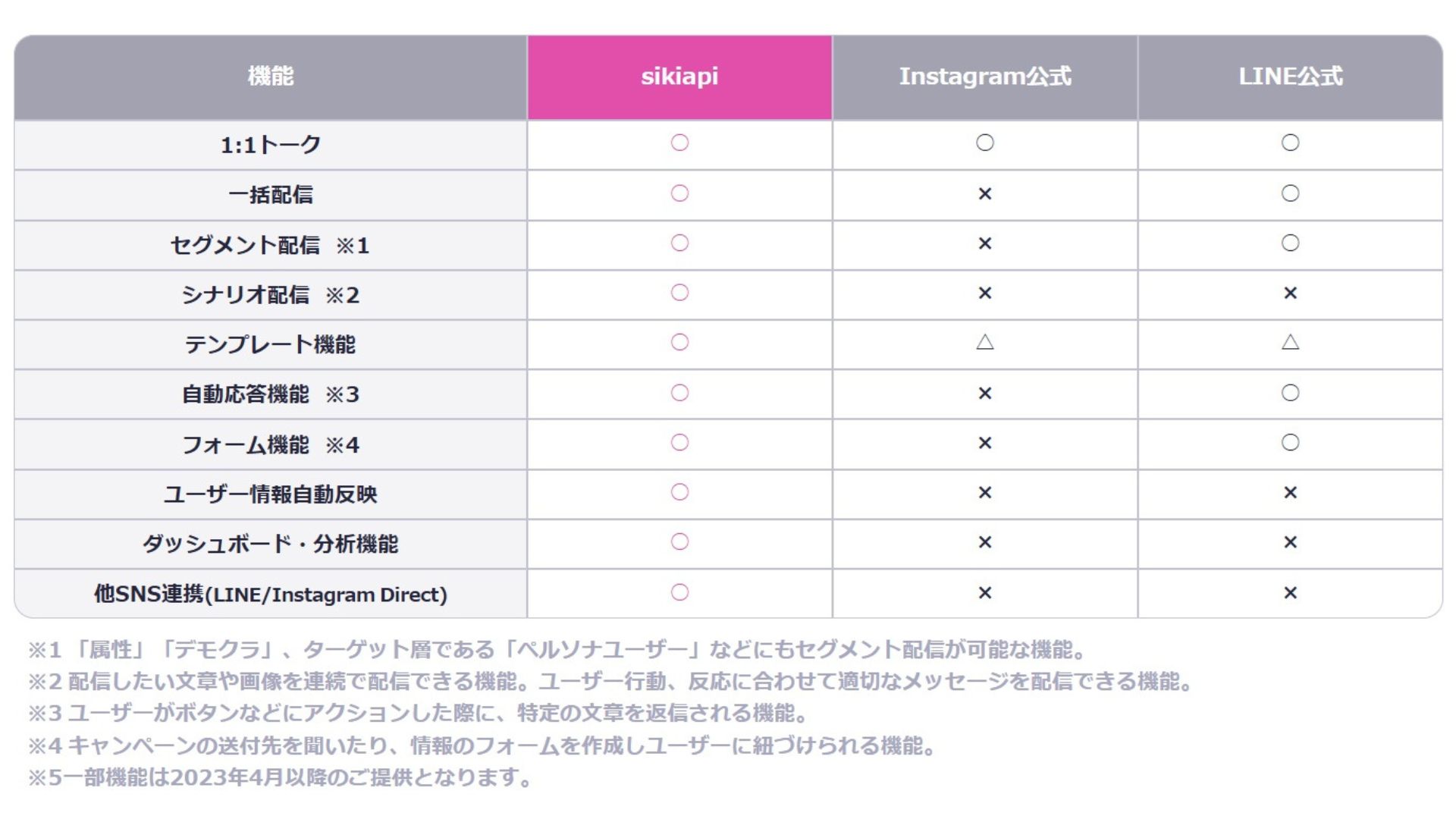
1. Scenario Distribution
The first feature of sikiapi to mention is its unique "Scenario Distribution" function. This feature allows you to continuously distribute multiple pre-registered text snippets or images, enabling the delivery of appropriate messages based on user behavior and reactions.
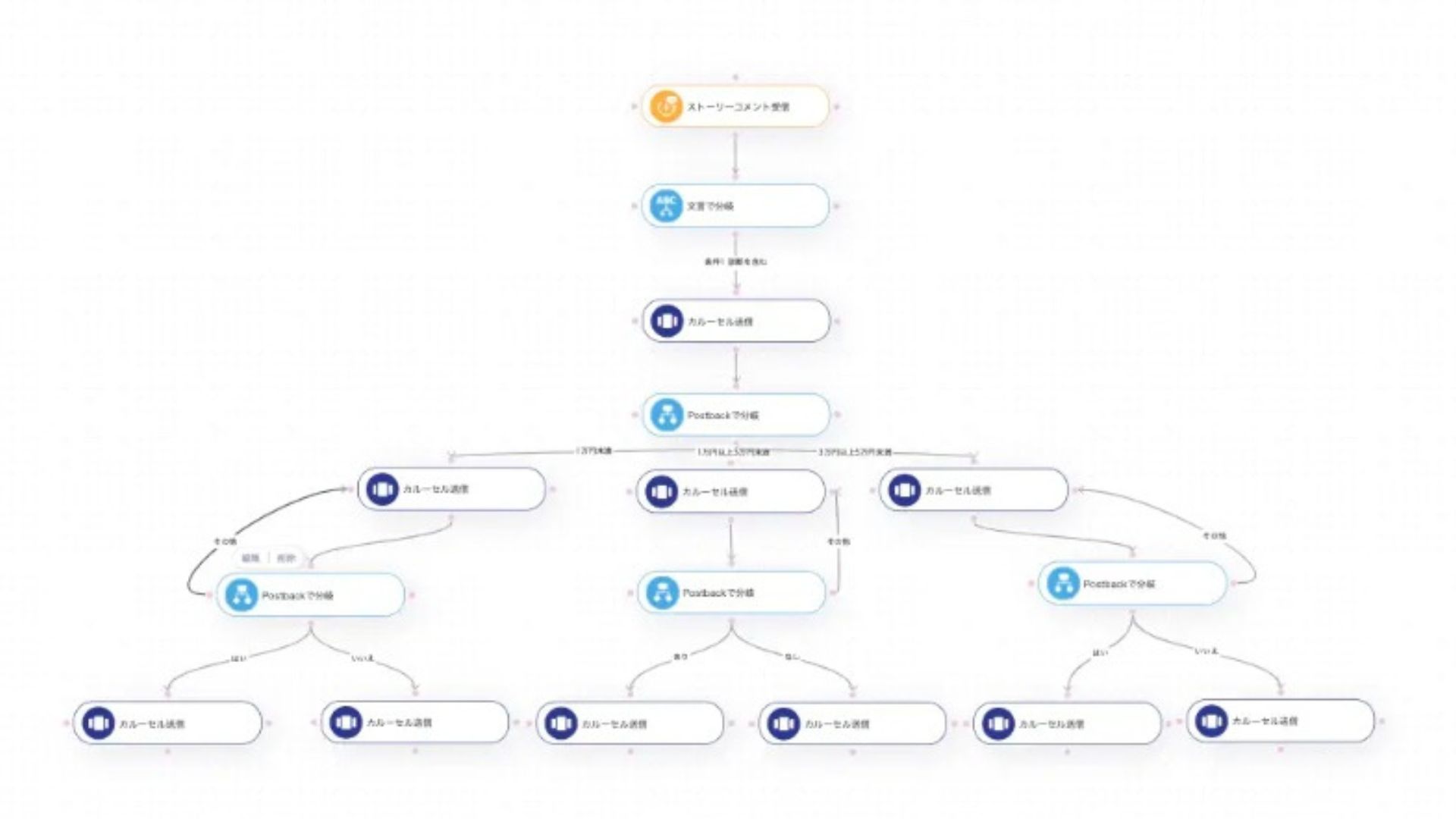
By selecting message templates from the scenario creation screen, you can easily create scenario distribution flows with only click operations.
Scenario distribution enables the following types of delivery:
- Distribute limited coupons and discount information to new followers
- Deliver recommended product information based on user behavior and interests
- Distribute guidance such as reviews and case studies
2. Segmented Distribution
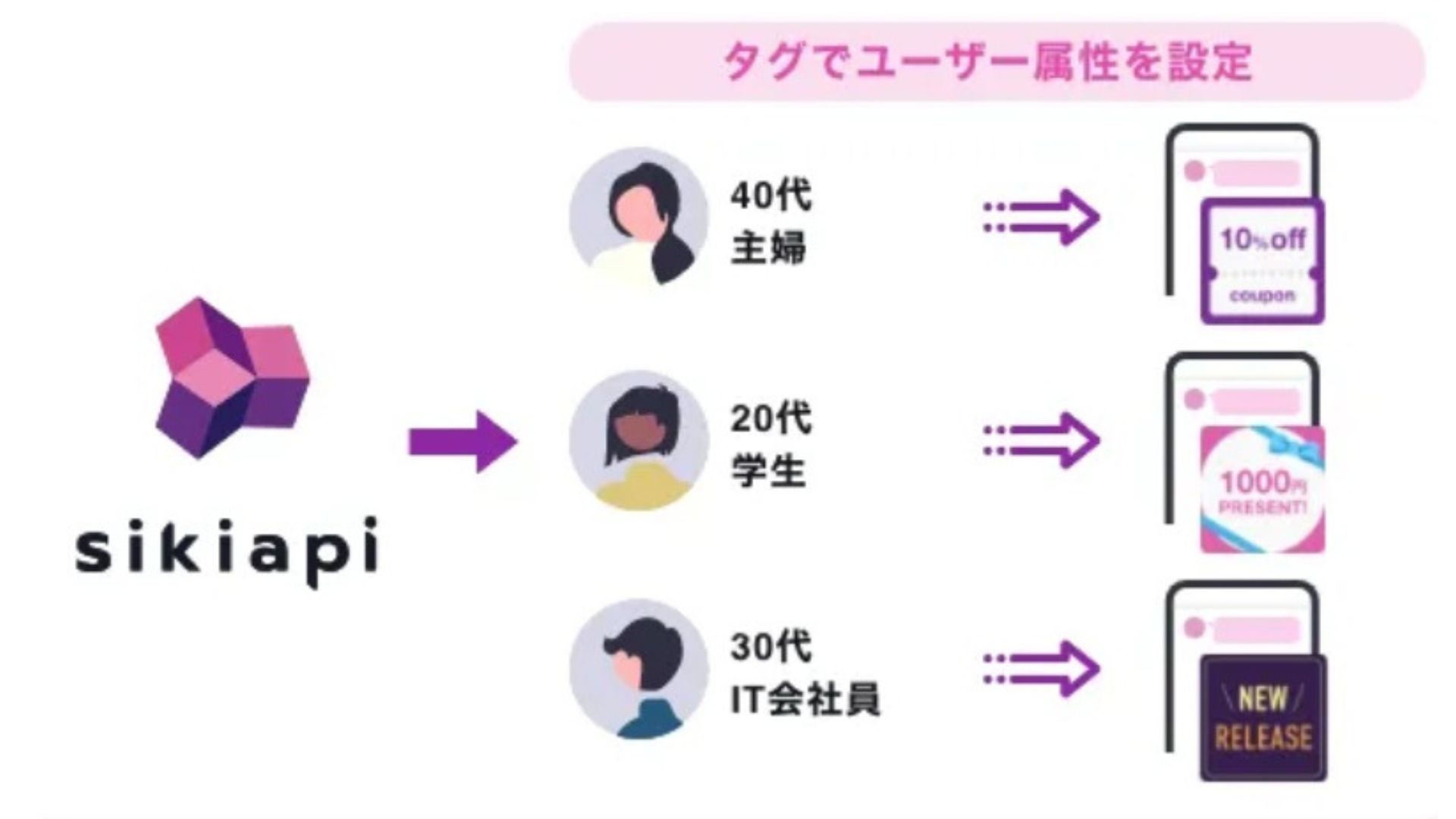
It is possible to deliver messages tailored to user attributes such as age, gender, and purchase status. By implementing an appropriate approach for each person, response rates are improved.
3. Issue Unique sikiapi ID and Password
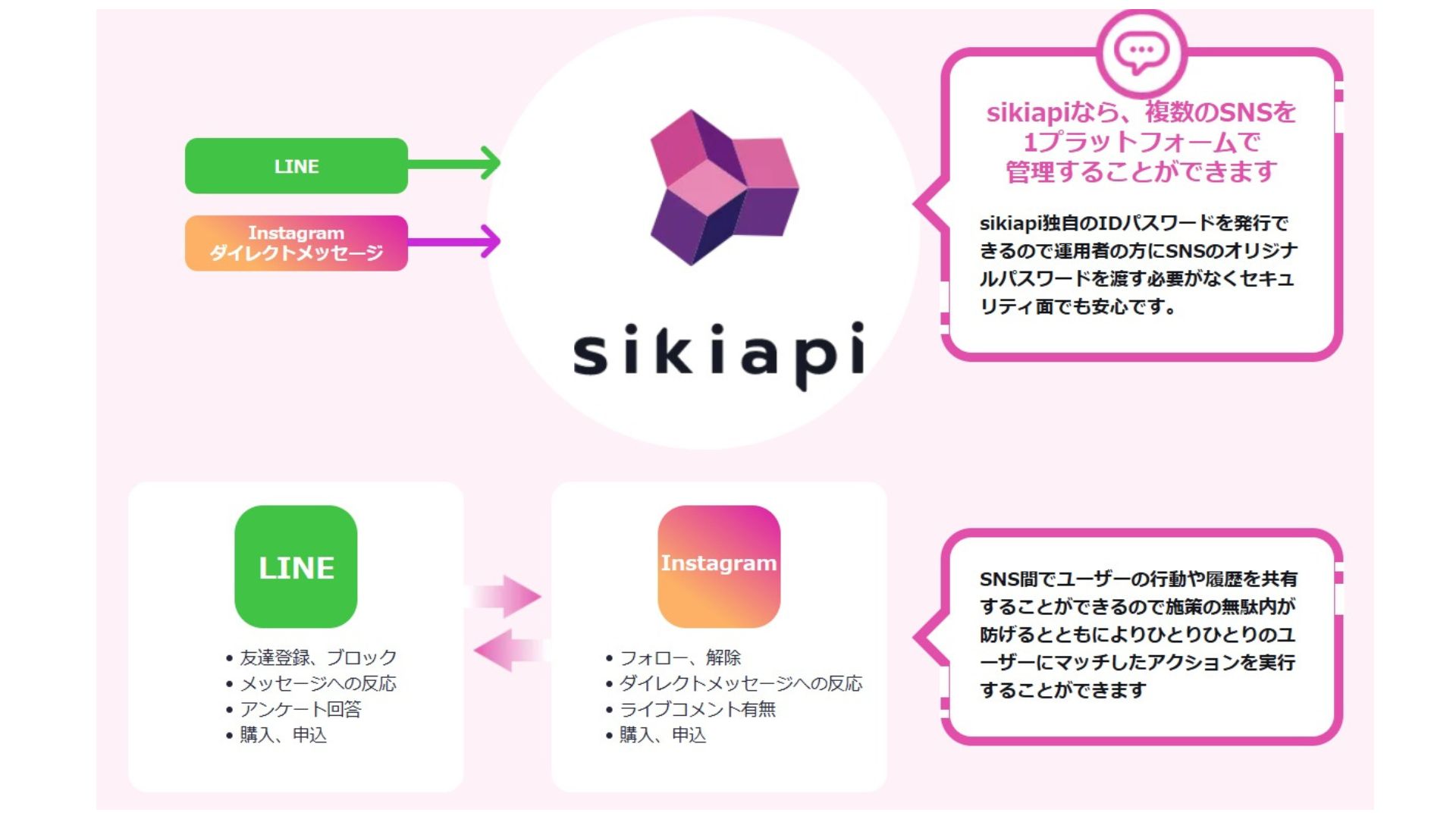
Because unique sikiapi IDs and passwords are issued, there is no need to share LINE or Instagram account credentials with operators, ensuring security in usage.
4. Other SNS Integration (LINE/Instagram Direct)
User actions and history can be shared between LINE and Instagram, reducing management effort and avoiding duplicate message distribution, enabling actions best suited for the user.
Other features include automated response functions, form functions, automatic user information reflection (not possible with standard LINE or Instagram features), and dashboard analysis functions.
If you want to improve the efficiency of your SNS operations and achieve more results, please utilize sikiapi. For questions regarding implementation or detailed information, please feel free to contact us.
| Item | Content |
|---|---|
Service Name | sikiapi |
Company Name | Tomira Inc. |
Official Site | https://sikiapi.com/ |